
We take a look in to the annoying issue of referral traffic spam on Google Analytics and how to go about stopping it. There are two main types, ghost referrals and web spam crawlers such as Semalt.
Here at Red Cow media we naturally spend a lot of time on Google Analytics, analysing visitor numbers, bounce rates and levels of organic, referral and direct traffic. In recent months we’ve noticed an alarming trend on the site with regards to referral traffic, there have been large amounts hitting our sites from places like free-share-buttons.com, get-free-traffic-now.com and free-social-buttons.com. Here is a list of what we have found to be the top 8 referring websites…
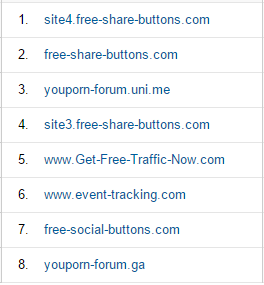

These visitors have a major impact from a search engine optimisation point of view, especially for smaller websites, as 300 spam referral per month could well be over 50% of the traffic coming to the website. With these spam visitors just being bots and not actually real people, they tend to hit the site and leave instantly, leading to terrible bounce rates and very low average session durations.
Who is behind Google referral spam?
We’ve done a little digging and found that the man responsible for many of these spam sites is a Russian called Vitaly Popov (if you fancy sending him a message, you can contact him at povitaly@mail.ru).
Unfortunately, we are helpless to do anything about it without the help of Google, so our Search Marketing Director, Stephen McCance, decided to get in touch with Search Engine Journal on Twitter who in turn passed on his message to Danny Sullivan, a well known industry expert with ties to Google who said the following…
@stephenmccance no idea, sorry, we might look closer at it
— Danny Sullivan (@dannysullivan) 11 May 2015
In other words, don’t hold your breath waiting for Google to sort this out. This brings us on to, how can you filter the Google Analytics referral spam yourself? Well there are a couple of different types of spam, it is important to identify which is which before trying to fix it. The main two are ghost referral traffic and spam web crawlers.
How to remove ghost referral spam on Google Analytics
Let’s tackle ghost referral traffic. This is the more annoying of the 2 and normally comes in the form of the list we put at the start of this post. The first thing to make sure you have done is checked the ‘Exclude all hits from known bots and spiders’ box…
- When you are viewing the stats of a specific website, click on the ‘Admin’ tab at the top of page
- Look at the ‘View’ list and click on ‘View Settings
- At the bottom of the page under ‘Bot Filtering’ check the ‘Exclude all hits from known bots and spiders’ box
- Click ‘Save’
Now you’ve done that, let’s actually look at how to sort your Analytics out. The first thing is, don’t take the bad advice that is common online and start putting hundreds of referral filters in to your Analytics account, in all likelihood you will just see the traffic change from referral traffic to direct traffic and you will be forever adding new sites to it meaning you will always be one step behind.
Instead, what we recommend you do is get a list of valid hostnames together and set a filter to include them and exclude everything else. This is much quicker and gets better results.
- Create a new view in Analytics so that you still have an untampered version should anything go wrong with your filter. To do this, go to the ‘Admin’ section and on the View list, click on the drop down box that says ‘All Web Site Data’ in it and click ‘create new view’.
- Next, take a look at your hostnames in Analytics by first of all using the last year as your date range and then going to Audience > Technology > Network and then selecting Hostname next to Service Provider.
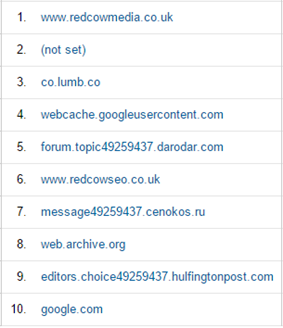
- There will be a list of sites displayed that you SHOULD have pages on (if you don’t then it’s spam), below is the list of host names for Red Cow Media. Number one is obviously ok, that is our site, and number 6 is ok, that is our old domain that is redirecting to our new one. Other than that though all of the other ones are spam.
PLEASE NOTE: A common host that is ok is YouTube if you have a channel on there. Be careful with ‘not set’ if you have goal conversions set up, they can sometimes go in to there so you may need to alter your tracking code first before excluding it.

- Now you have your list of hostnames that are NOT spam and are ok you need to build your filter expression. Get your domain names together and put them in the format below…
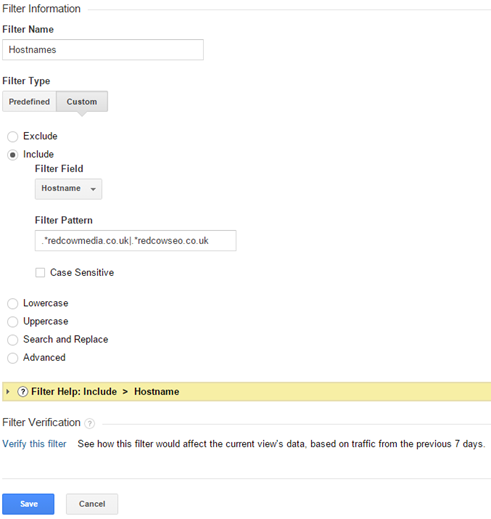
.*redcowmedia.co.uk|.*redcowseo.co.uk
- Points to note are that you need the full stop and asterisk before each domain name (.*) with NO space between the asterisk and first letter. After the domain you need a bar (|) and again no spaces in between characters. You simply keep on building up your expression with all of the hostnames you want to keep.
- Next you need to go to the Admin section of Google Analytics and select the new view you created. Click on ‘Filters’ and then ‘+NEW FILTER’, then fill out your filter in the format below…

How to remove web spam crawlers
The second form of spam, the spam web crawlers such as Semalt are reasonably easy to get rid of. Semalt primarily do it to get people to view their site, they know the people looking at their site will be highly qualified and users of Google Analytics so it is actually quite a clever marketing ploy. They do also actually allow you to go on to their site and remove your website from the crawling list at http://semalt.net so it is worth doing that first.
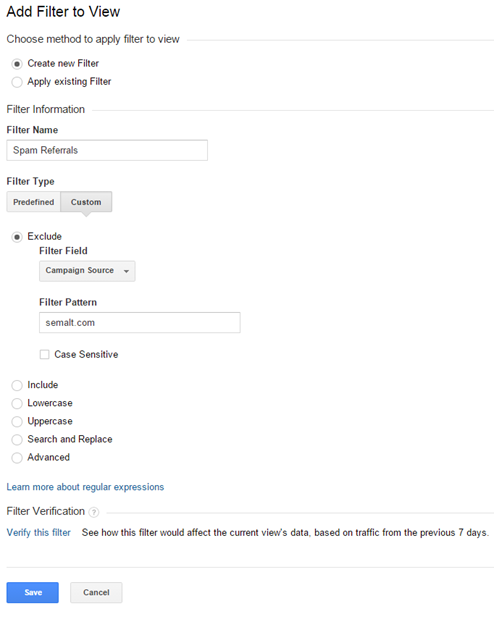
To get rid of other web crawlers, the best thing to do is create a filter for them. As there aren’t too many of these about it isn’t too time consuming. The key is to find a unique way of identifying them, we have found the best way is to filter by ‘Campaign Source’ with a matching domain. Take a look at the screenshot below on how to fill out your filter…

Look out for our upcoming post on how to filter historic data and get rid of the spam on visits you’ve already had to your site.